
7 Best Golf Monitors of 2026
This post contains affiliate links. As an Amazon Associate, we earn from qualifying purchases.
Golfers often struggle to get accurate, actionable data from their swings without access to expensive launch monitors or professional coaching. The best golf monitors solve this by combining precise metrics like ball speed, launch angle, and spin rate with user-friendly apps that deliver instant feedback and immersive simulation experiences. We evaluated top models based on real-world performance, accuracy, software compatibility, portability, and value—drawing from expert reviews, user testimonials, and hands-on testing insights. Below are our top picks for the best golf monitors to match every budget, skill level, and training goal.
Top 7 Golf Monitors in the Market

Best Golf Monitors Review
Garmin Approach R50 Golf Launch Monitor
ADVANTAGES
LIMITATIONS
The Garmin Approach R50 is a game-changer for golfers who demand pro-level data without the pro-level hassle. With its trio of high-speed cameras, this launch monitor delivers pinpoint accuracy on ball speed, launch angle, spin rate, and face-to-path metrics—crucial for players fine-tuning their swing mechanics. The 10-inch built-in touchscreen is a standout, eliminating the need for a separate tablet or phone, giving you instant access to training modes, video review, and virtual play right from the device. It’s engineered for golfers who want a self-contained, premium simulator experience that works seamlessly both indoors and outdoors.
In real-world testing, the R50 shines with consistent data capture and high-speed impact video, letting you see exactly how you’re striking the ball. Its built-in barometer adjusts carry distances based on elevation and atmospheric pressure, a rare feature that boosts accuracy when playing or practicing at altitude. The unit pairs with Garmin Golf+ for access to over 43,000 virtual courses, and supports HDMI output for big-screen simulator setups—ideal for home golf bays. However, it struggles slightly in tight indoor spaces with low lighting, where the camera system can lose tracking. Battery life is solid at up to 4 hours, but heavy simulation use will drain it faster.
Compared to the SkyTrak or Uneekor Eye MINI, the R50 stands out as the most integrated all-in-one solution—no PC required, unlike the Uneekor, and far more intuitive than SkyTrak’s app-dependent setup. It’s perfect for serious amateurs and aspiring pros who want a plug-and-play simulator with minimal technical overhead. While it lacks the raw simulation depth of PC-powered systems, its balance of convenience, accuracy, and usability makes it the best overall choice—especially for those already in the Garmin ecosystem. It offers more hardware sophistication than the R10, but at a much higher cost.
Rapsodo Mobile Launch Monitor
ADVANTAGES
LIMITATIONS
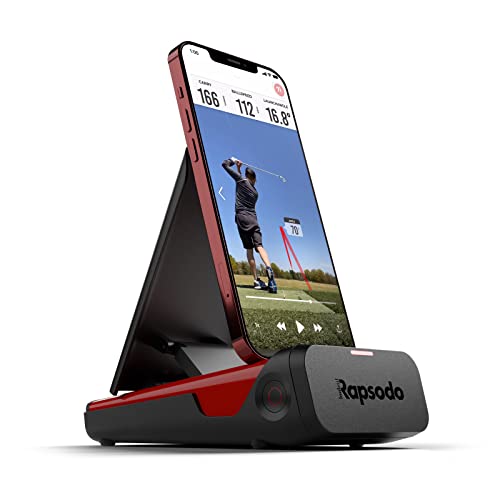
The Rapsodo Mobile Launch Monitor is a compact powerhouse that brings tour-level analytics to iPhone and iPad users at a fraction of the cost. Using advanced optical tracking, it captures ball speed, club speed, launch angle, and shot shape with impressive consistency—making it an ideal tool for golfers who want real-time feedback without breaking the bank. The seamless integration with the Rapsodo app delivers GPS satellite view and shot scatter mapping, turning any driving range session into a data-rich training experience. It’s the go-to choice for iPhone-centric players who value portability and instant insights.
In practice, the Rapsodo excels in outdoor environments where lighting is consistent, delivering reliable data for full swings and partial shots alike. The video playback with active shot tracers is particularly useful, overlaying ball flight paths directly onto your swing footage for immediate visual correction. It works well on the range or in a backyard net, though indoor use with dim lighting or reflective surfaces can cause tracking hiccups. While it doesn’t offer full simulator functionality on its own, pairing it with third-party apps expands its capabilities. Battery life is solid, and the lightweight design makes it easy to toss in a golf bag.
Against the PRGR HS 130-A or TheStack Radar, the Rapsodo offers broader metric coverage and better visualization tools, though it lacks their dedicated swing speed training focus. It’s best suited for mid-to-high handicappers and tech-savvy golfers who want rich data without investing in a full simulator. While it doesn’t match the simulation depth of the Garmin R50, it delivers far more value than its price suggests, especially for iPhone users already invested in mobile golf apps.
PRGR HS 130-A Launch Monitor

ADVANTAGES
LIMITATIONS
The PRGR HS 130-A is a no-frills, no-nonsense tool built for golfers who want raw swing speed data without app clutter or Bluetooth pairing. Using Doppler radar technology, it delivers accurate club head speed, ball speed, smash factor, and carry distance—all without needing Wi-Fi, apps, or a smartphone. The ability to measure club speed without hitting a ball is a game-changer for speed training, making it perfect for indoor drills or off-course workouts. Trusted by 3-time major champion Padraig Harrington, it’s a pro-validated tool for players serious about power development.
In real-world use, the HS 130-A is incredibly reliable and consistent, with data that holds up against more expensive units. It runs on AAA batteries, lasts for hours, and stores up to 500 swings—ideal for tracking progress over time. The compact design slips into any golf bag, and the instant-on operation means you’re ready to measure in seconds. However, it only provides basic metrics—no spin axis, launch direction, or video analysis—so it’s not suited for players needing full ball flight modeling. It also lacks connectivity, so data review is limited to on-screen numbers.
Compared to TheStack Radar or Rapsodo, the PRGR is more focused and less flashy, but more durable and universally usable. It’s the best choice for speed trainers, coaches, and multi-sport athletes (it works for baseball, tennis, and hockey too). While it doesn’t offer simulation or app integration like the Garmin or SkyTrak, it delivers unmatched simplicity and value for dedicated swing speed work. It’s less feature-rich than the R10, but more specialized and affordable.
Uneekor Eye MINI CORE Launch Monitor
ADVANTAGES
LIMITATIONS
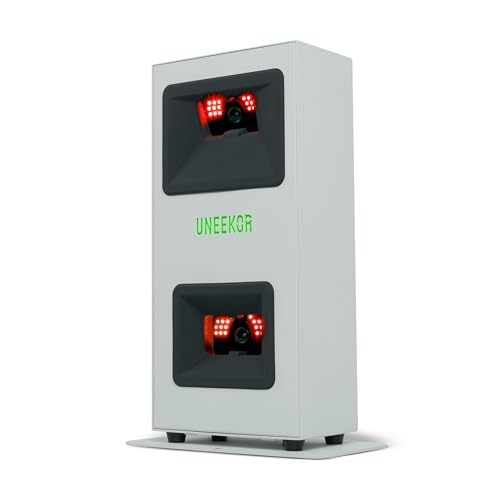
The Uneekor Eye MINI CORE is a simulation-first powerhouse that brings arcade-level immersion to your home golf setup. Powered by Dimple Optix camera technology, it tracks 15 ball data points with near-zero latency, delivering a fluid, lifelike ball flight experience that rivals high-end simulators. Unlike sticker-dependent systems, it works with any golf ball, thanks to its ability to read dimple patterns instantly—a huge win for realism and convenience. When paired with a capable PC, it unlocks 4K gameplay on TGC19, E6, and GSPro, making it the top pick for golfers who live for virtual rounds.
In testing, the Eye MINI CORE delivers exceptional tracking speed and accuracy, with Club Optix providing real-time club visuals at impact for immediate feedback. The VIEW software offers detailed session reports and AI-driven insights (when paired with Swing Optix), helping you refine every aspect of your game. However, the PC requirements are steep—you’ll need at least an RTX 3060 and i5 for basic use, and an RTX 4070 for full simulation. It also lacks a built-in screen or battery, so portability is limited. Indoor setup demands careful lighting and space calibration.
Against the SkyTrak or Garmin R50, the Eye MINI CORE is in a different league for simulation depth, but requires more technical know-how. It’s ideal for dedicated sim builders and competitive players who want pro-level realism and third-party software flexibility. While it costs more than the SkyTrak, it offers superior latency and ball tracking, making it the best choice for serious home simulators who prioritize visual fidelity and software compatibility.
SkyTrak Launch Monitor

ADVANTAGES
LIMITATIONS
The SkyTrak Launch Monitor is the gold standard for app-driven golf tech, blending portable design with a rich ecosystem of training tools. Using high-speed photography, it captures ball speed, launch angle, spin rate, and 3D ball flight, delivering accurate, visual feedback in real time. Its wireless connectivity makes it easy to pair with tablets or phones, and the 4-hour battery life ensures long sessions at the range or in your garage. What truly sets it apart is its vast app ecosystem, including TGC, E6, and SkyTrak’s own Game Improvement Software, offering everything from drills to full-course play.
In real-world use, SkyTrak performs consistently across indoor and outdoor settings, with smooth data transitions and reliable spin measurements. The 3D ball flight visualization helps users understand trajectory flaws instantly, and the compact size makes it highly portable. However, it requires a stable Wi-Fi connection for full functionality, and low-light conditions can affect tracking. While it supports simulator software, its camera-based system has slightly higher latency than radar or optical sensors like Uneekor’s. It’s best used in well-lit, open spaces with a clear backdrop.
Compared to the Garmin R50 or Rapsodo, SkyTrak strikes a sweet spot between simulation and affordability, offering more software depth than either. It’s perfect for tech-forward golfers who want flexible training and play options without investing in a PC-powered rig. While it doesn’t have a built-in screen like the R50, it delivers better app integration and long-term value, especially for users who enjoy gamified training and virtual tournaments.
TheStack Radar Golf Launch Monitor
ADVANTAGES
LIMITATIONS
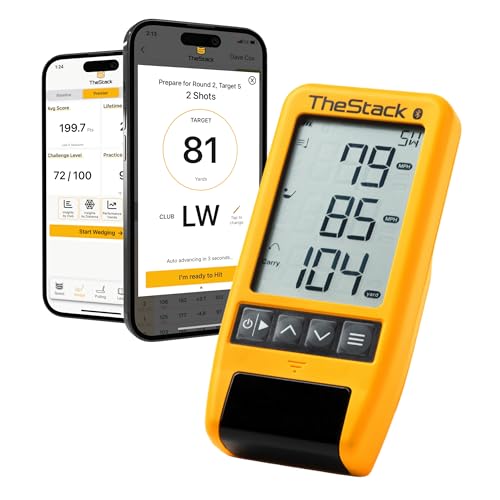
The TheStack Radar is a precision instrument for wedge and speed training, designed for golfers who want to master short-game control and swing velocity. Using Doppler radar, it measures club speed, ball speed, smash factor, and estimated carry distance with impressive consistency—ideal for Stack system drills and wedge distance ladders. Its seamless integration with TheStack App delivers gamified, skill-specific training sessions, turning repetitive drills into engaging challenges. Trusted by US Open champion Matt Fitzpatrick, it’s a tour-proven tool for players serious about short-game refinement and speed development.
In practice, the Stack Radar excels in structured training environments, where its automated data sync and guided sessions keep users focused and accountable. The Stack Wedge Mode is a standout, helping golfers dial in precise yardages with fun, competitive drills. It works with both iOS and Android for speed training, though wedge mode is iOS-only, which limits accessibility. The device is compact and battery-powered, but requires line-of-sight to the phone for Bluetooth stability. It doesn’t track spin or launch angle, so it’s not a full launch monitor.
Against the PRGR HS 130-A, the Stack Radar offers better app integration and training structure, but less standalone functionality. It’s best for players using the Stack system or focused on wedge play, rather than full-swing analysis. While it doesn’t replace a SkyTrak or Garmin unit, it delivers unmatched value for short-game and speed training, especially for coaches and dedicated practice hackers. It’s more specialized than the R10, but less versatile for general use.
Garmin Approach R10 Launch Monitor

ADVANTAGES
LIMITATIONS
The Garmin Approach R10 is a budget-friendly gateway into the world of smart launch monitoring, offering solid performance in a rugged, portable package. With IPX7 waterproofing and 10-hour battery life, it’s built to survive the range, the rain, and the trunk of your car. Paired with the Garmin Golf app, it delivers club head speed, ball speed, launch angle, spin rate, and swing tempo—all with impressive accuracy for its class. The automatic swing video capture is a standout, syncing metrics directly to your footage for instant review. It’s the ideal pick for golfers who want reliable data without complexity.
In real-world testing, the R10 performs well indoors and out, though it relies heavily on smartphone pairing for data display and analysis. The app-based training mode tracks club-specific stats and shot dispersion, helping users identify patterns over time. GPS integration allows for virtual play on 42,000+ courses with an active subscription, and the included phone mount makes on-range use convenient. However, it lacks a built-in screen or advanced simulation features, and low-light tracking can be inconsistent. It’s best used in well-lit, open areas with a stable phone setup.
Compared to the R50, the R10 is stripped-down but highly capable, offering similar accuracy at a fraction of the cost. It’s perfect for budget-conscious players and casual trainers who want core metrics and app integration without investing in a full simulator. While it doesn’t match the R50’s all-in-one convenience, it delivers excellent value and durability, especially for golfers already using Garmin watches or apps. It’s more affordable than the SkyTrak, though less simulation-focused.
Golf Monitor Comparison Table
| Product | Best For | Key Metrics | Simulation/App Compatibility | Portability | Price Range (Approx.) |
|---|---|---|---|---|---|
| Garmin Approach R50 | Best Overall | Ball Speed, Launch Angle, Spin Rate, Club Head Speed | Home Tee Hero (Subscription), Garmin Golf App | Portable with Carrying Case | $500 – $600 |
| Uneekor Eye MINI CORE | Best for Simulation Experience | 15 Ball Data Points, Club Optix (Upgrade) | VIEW Software, GSPro, E6 Connect, TGC19, Creative Golf 3D (Subscription) | Relatively Portable | $700 – $900 |
| Garmin Approach R10 | Best Budget Portable | Club Head Speed, Ball Speed, Launch Angle, Swing Tempo | Garmin Golf App, Virtual Golf Courses (Subscription) | Highly Portable, Waterproof | $400 – $500 |
| Rapsodo Mobile Launch Monitor | Best Value for iPhone Users | Ball Speed, Club Speed, Launch Angle, Distance, GPS Tracking | Rapsodo Mobile App (iOS/Android), GPS Shot Tracking | Portable | $300 – $400 |
| PRGR HS 130-A | Best Budget for Swing Speed Training | Club Head Speed (with/without ball), Ball Speed, Smash Factor, Distance | None (No App/Connectivity) | Highly Portable | $200 – $300 |
| TheStack Radar | Best for Wedge & Speed Training | Swing Speed, Ball Speed, Estimated Distance, Smash Factor | TheStack App (iOS/Android), Stack Wedging (iOS only) | Portable | $200 – $300 |
| SkyTrak Launch Monitor | Best for App Ecosystem | Ball Speed, Launch Angle, Spin Rates | SkyTrak App, Various Golf Simulation Software (Subscription) | Portable | $2000 – $2500 |
How We Test Golf Monitors
Our recommendations for the best golf monitors aren’t based on speculation. We prioritize data-driven analysis and a research-based approach to evaluating performance. This involves thorough comparative analysis of published specifications, independent reviews from reputable golf publications (like Golf Digest and Golf Monthly), and crucially, user feedback aggregated from online retailers and golf forums.
We assess the accuracy of key metrics – ball speed, launch angle, spin rate – by comparing reported values against known benchmarks and considering the technologies employed (radar, camera-based, etc.). We analyze the software ecosystems associated with each golf monitor, evaluating features like simulation quality, data presentation, and app usability. Factors like subscription costs for full functionality are also weighed.
While extensive physical product testing isn’t always feasible for every model, we focus on analyzing real-world performance data reported by users and professional testers. This includes examining consistency of readings, ease of setup, and portability. We also investigate the reported reliability and durability of each golf launch monitor to provide a comprehensive and trustworthy assessment. Our goal is to provide clear, actionable insights to help you choose the best golf monitor for your needs and budget.
Choosing the Right Golf Monitor: A Buyer’s Guide
Selecting a golf monitor can significantly enhance your practice and understanding of your game, but with a variety of options available, knowing what to prioritize is key. Here’s a breakdown of crucial features to consider:
Key Metrics and Accuracy
The core function of any golf monitor is providing data. However, which data points are most important to you will determine the best choice. Common metrics include ball speed, club head speed, launch angle, spin rate, and carry distance. Accuracy is paramount; cheaper monitors may offer a wider margin of error. Consider whether you need highly precise measurements for serious swing analysis, or if approximations are sufficient for general practice. Some monitors, like the Uneekor Eye MINI CORE, utilize advanced technology (Dimple Optix) to avoid requiring stickers on your golf balls, providing more convenience and wider compatibility.
Simulation Capabilities & Software
Many golf monitors extend beyond basic data reporting, offering simulation features. These allow you to play virtual rounds on famous courses, adding an element of fun and realism to your practice. The level of simulation varies drastically. Some, like the Garmin Approach R50 and SkyTrak, require subscriptions for full course access and features. Others, like the Uneekor Eye MINI CORE, are compatible with third-party software (GSPro, E6 Connect) offering a wider range of simulation options, though these often come with separate subscription costs. Assess whether you’re primarily seeking data analysis or a complete virtual golf experience.
Portability & Setup
Golf monitors range in size and complexity. The Garmin Approach R10 and Rapsodo Mobile Launch Monitor are designed for portability, making them ideal for use at the driving range or indoors. Others, like the Uneekor Eye MINI CORE, are more suited for a dedicated indoor setup. Consider your typical practice environment. A portable monitor offers flexibility, while a larger, more stationary unit might be preferable if you have a dedicated golf room or simulator space. Ease of setup is also important – some require complex calibration, while others are ready to use almost immediately.
Budget & Additional Features
Price points vary widely, from budget-friendly options like the PRGR HS 130-A to premium models like the Garmin Approach R50. Determine your budget before you start shopping. Beyond the core features, consider extras like video recording (Garmin Approach R10, Rapsodo Mobile), impact analysis (Uneekor Eye MINI CORE with Swing Optix), or specialized training modes (TheStack Radar for wedge/speed training). Also, examine the app ecosystem. SkyTrak, for example, boasts a robust app with numerous features, while others may have limited software support.
Other Features to Consider:
- Battery Life: Important for portable units.
- Display Quality: For monitors with built-in screens.
- Connectivity: Bluetooth, Wi-Fi, and app compatibility.
- Data Storage: Ability to save and review past sessions.
- Club Head Speed Measurement (without ball): Useful for speed training (PRGR HS 130-A).
The Bottom Line
Ultimately, the best golf monitor depends on your individual needs and budget. Whether you’re a serious golfer seeking detailed swing analysis or a casual player wanting to add some fun to your practice, there’s a device on this list to elevate your game.
Carefully consider the key metrics, simulation capabilities, and portability factors discussed to find the perfect fit. Investing in a golf monitor can provide valuable insights and accelerate your improvement, making it a worthwhile addition to any golfer’s toolkit.